
Documentation Index

Fetch the complete documentation index at: https://developers.particle.network/llms.txt

Use this file to discover all available pages before exploring further.

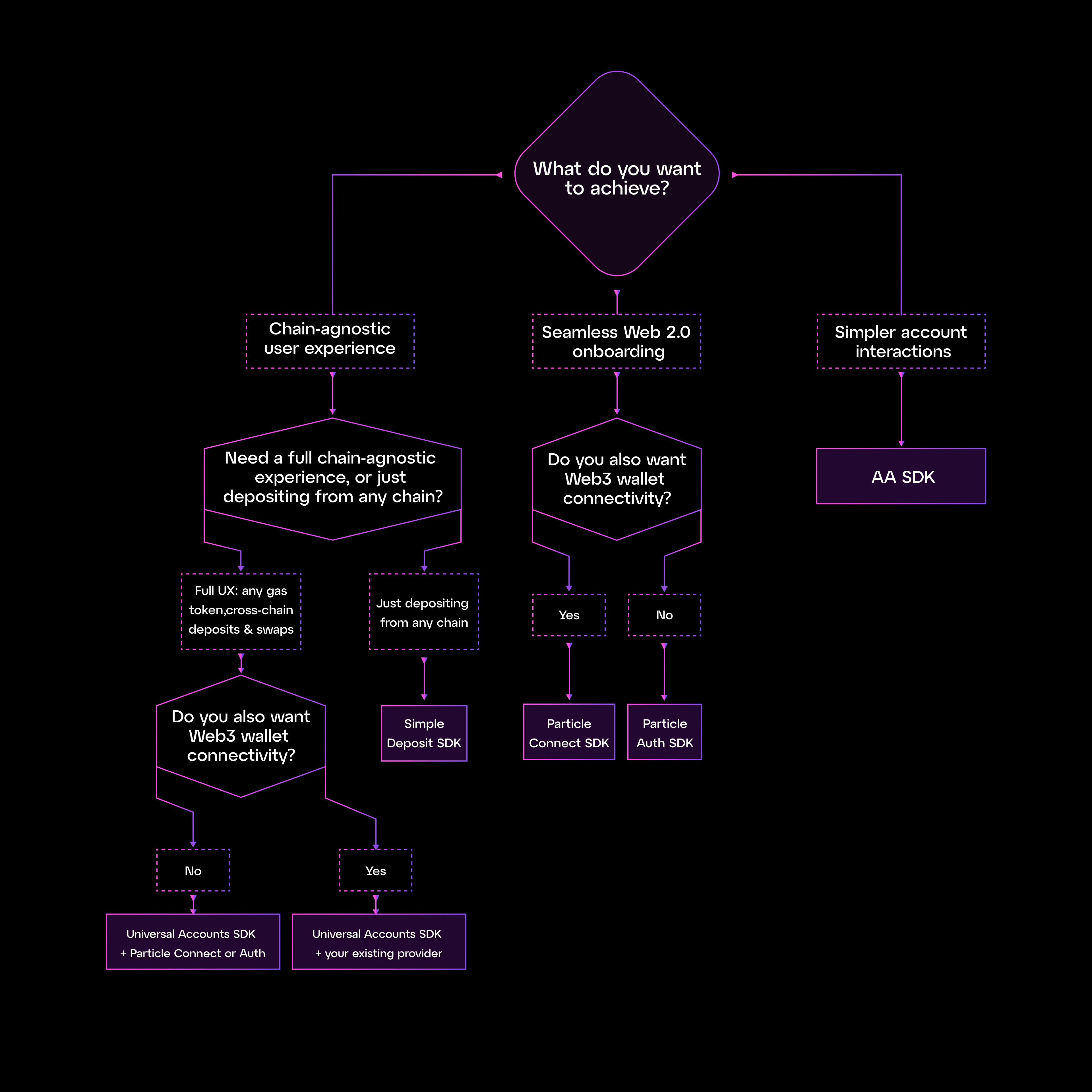
Particle Network ships five SDKs. They’re independent, free to use, and designed to compose. Most apps pick a stack of two or more — for example, a signer (Particle Auth or Connect) plus Universal Accounts. This page helps you pick that stack. Use the flow chart to reason it out, or jump straight to your scenario below.

Pick a stack

Pick a stack
Pick the scenario that matches your app — each links to the right starting point.

New multi-chain app

Cross-chain UX from day one. Universal Accounts SDK + Particle Connect (or Auth for social-only onboarding).

Existing app, add chain abstraction

Keep your users and wallet stack. Universal Accounts SDK + your existing provider — no migration.

Onboard users, no seed phrases

Social login → instant wallet. Particle Connect for a wallet picker, Particle Auth for a branded custom UI.

Accept deposits from any chain

Single-chain app, funds arrive as USDC. Simple Deposit — wallet-agnostic, no other UX changes.

Smart accounts, full control

Direct bundler & paymaster access. AA SDK — ERC-4337 primitives, pair with any signer.

Particle Auth vs Particle Connect

Both turn a social login into a wallet. Here’s how they differ.
Particle ConnectParticle Auth
LoginsSocial + external walletsSocial only
UIPre-built modalFully customizable
Account AbstractionBuilt inAdd via AA SDK
Best forA drop-in that covers everyoneA branded Web2-style sign-in

SDK glossary

A one-line summary of everything Particle Network ships.
ProductWhat it does
Universal Accounts SDKOne account and unified balance across all supported chains. Users never bridge. Uses EIP-7702 so existing wallets opt in without migrating funds. → Docs
Simple DepositPer-chain deposit addresses; funds auto-bridge to your destination chain as USDC. Wallet-agnostic. Not compatible with Particle Connectkit/Authkit. → Docs
Particle ConnectDrop-in modal for social logins and external wallets. AA-enabled viem provider built in. → Docs
Particle AuthSocial login → EOA. Full UI customization. Pair with the AA SDK for smart-account features. → Docs
AA SDKERC-4337 bundler + paymaster + smart account management. Use it directly when you want primitives. → Docs
Can I use Universal Accounts without Particle Auth or Connect?Yes. The Universal Accounts SDK is provider-agnostic — pair it with Particle Connect, Particle Auth, RainbowKit, Web3Modal, wagmi, or any signer that exposes a standard wallet provider.