> ## Documentation Index
> Fetch the complete documentation index at: https://developers.particle.network/llms.txt
> Use this file to discover all available pages before exploring further.

# Quickstart: Integrating Particle Connect into Your Web Application

export const InteractiveConnectkit = () => {
  const ethereumIcon = "https://static.particle.network/mintlify/snippets/logos/eth.png";
  const polygonIcon = 'https://static.particle.network/mintlify/snippets/logos/polygon.png';
  const seiIcon = 'https://static.particle.network/mintlify/snippets/logos/sei.png';
  const baseIcon = 'https://static.particle.network/mintlify/snippets/logos/base.png';
  const BerachainbArtioIcon = 'https://static.particle.network/mintlify/snippets/logos/bera.png';
  const authIcons = {
    email: 'https://static.particle.network/mintlify/snippets/logos/email.png',
    phone: 'https://static.particle.network/mintlify/snippets/logos/phone.png',
    facebook: 'https://static.particle.network/mintlify/snippets/logos/facebook.png',
    google: 'https://static.particle.network/mintlify/snippets/logos/google.png',
    apple: 'https://static.particle.network/mintlify/snippets/logos/apple.png',
    twitter: 'https://static.particle.network/mintlify/snippets/logos/twitter.png',
    discord: 'https://static.particle.network/mintlify/snippets/logos/discord.png',
    github: 'https://static.particle.network/mintlify/snippets/logos/github.png',
    microsoft: 'https://static.particle.network/mintlify/snippets/logos/microsoft.png',
    linkedin: 'https://static.particle.network/mintlify/snippets/logos/linkedin.png'
  };
  if (typeof document === "undefined") {
    return null;
  } else {
    setTimeout(() => {
      const chains = [{
        id: 'mainnet',
        name: 'Ethereum',
        icon: ethereumIcon
      }, {
        id: 'polygon',
        name: 'Polygon',
        icon: polygonIcon
      }, {
        id: 'sei',
        name: 'Sei',
        icon: seiIcon
      }, {
        id: 'base',
        name: 'Bese',
        icon: baseIcon
      }, {
        id: 'berachainTestnetbArtio',
        name: 'BerachainbArtio',
        icon: BerachainbArtioIcon
      }];
      let selectedChains = ['mainnet', 'polygon'];
      let selectedAuthTypes = ['email', 'google', 'twitter', 'github'];
      let allSocialLoginsSelected = false;
      const authTypes = Object.keys(authIcons);
      const handleToggleChain = chainId => {
        const index = selectedChains.indexOf(chainId);
        if (index > -1) {
          selectedChains = selectedChains.filter(id => id !== chainId);
        } else {
          selectedChains.push(chainId);
        }
        renderToggles();
        renderCodeSnippet();
      };
      const handleToggleAuthType = authTypeId => {
        if (authTypeId === 'allSocialLogins') {
          allSocialLoginsSelected = !allSocialLoginsSelected;
          selectedAuthTypes = allSocialLoginsSelected ? [] : selectedAuthTypes;
        } else {
          const index = selectedAuthTypes.indexOf(authTypeId);
          if (index > -1) {
            selectedAuthTypes = selectedAuthTypes.filter(id => id !== authTypeId);
          } else {
            selectedAuthTypes.push(authTypeId);
          }
          allSocialLoginsSelected = false;
        }
        renderAuthToggles();
        renderCodeSnippet();
      };
      const renderToggles = () => {
        const toggleContainer = document.getElementById('toggle-buttons');
        toggleContainer.innerHTML = chains.map(chain => `
          <button
            class="toggle-button ${selectedChains.includes(chain.id) ? 'selected' : ''}"
            onclick="handleToggleChain('${chain.id}')"
          >
            <img src="${chain.icon}" alt="${chain.name}" class="icon"/>
          </button>
        `).join('') + `<button
          class="toggle-button"
          onclick="window.location.href='/guides/network-coverage';"
          style="opacity: 0.5; color: white; background-color: rgba(255, 255, 255, 0.1);"
        >
          +62
        </button>`;
      };
      const renderAuthToggles = () => {
        const authToggleContainer = document.getElementById('auth-toggle-buttons');
        authToggleContainer.innerHTML = `
          <button
            class="toggle-button ${allSocialLoginsSelected ? 'selected' : ''}"
            onclick="handleToggleAuthType('allSocialLogins')"
          >
            All
          </button>
        ` + authTypes.map(authType => `
          <button
            class="toggle-button ${selectedAuthTypes.includes(authType) ? 'selected' : ''}"
            onclick="handleToggleAuthType('${authType}')"
          >
            <img src="${authIcons[authType]}" alt="${authType}" class="icon"/>
          </button>
        `).join('');
      };
      const renderCodeSnippet = () => {
        const importStatements = `import { ${selectedChains.join(", ")} } from '@particle-network/connectkit/chains';`;
        const supportChainsArray = `chains: [${selectedChains.join(", ")}],`;
        const authTypesArray = !allSocialLoginsSelected ? `authTypes: [${selectedAuthTypes.map(type => `'${type}'`).join(", ")}],` : "// No need for the authTypes array if you want to include all of the available social login options";
        const codeSnippet = `
"use client";

// Particle imports
import { ConnectKitProvider, createConfig } from '@particle-network/connectkit';
import { authWalletConnectors } from '@particle-network/connectkit/auth';
import { evmWalletConnectors } from '@particle-network/connectkit/evm';
import { solanaWalletConnectors } from '@particle-network/connectkit/solana';
import { EntryPosition, wallet } from '@particle-network/connectkit/wallet';

${importStatements} // Chains are imported here
import React from 'react';

const config = createConfig({
  projectId: process.env.NEXT_PUBLIC_PROJECT_ID!,
  clientKey: process.env.NEXT_PUBLIC_CLIENT_KEY!,
  appId: process.env.NEXT_PUBLIC_APP_ID!,

  appearance: {
    recommendedWallets: [
      { walletId: 'metaMask', label: 'Recommended' },
      { walletId: 'coinbaseWallet', label: 'popular' },
    ],
    language: 'en-US',
    mode: "auto", // dark or auto.
  },
  
  walletConnectors: [
    evmWalletConnectors({
      // Replace this with your app metadata.
      metadata: {
        name: 'Connectkit Demo',
        icon: typeof window !== 'undefined' ? \`\${window.location.origin}/favicon.ico\` : '',
        description: 'Particle Connectkit Next.js Scaffold.',
        url: typeof window !== 'undefined' ? window.location.origin : '',
      },
      walletConnectProjectId: process.env.NEXT_PUBLIC_WALLETCONNECT_PROJECT_ID as string,
    }),
    
    authWalletConnectors({
      ${authTypesArray} // Optional, restricts the types of social logins supported
    }),
  ],
  
  plugins: [
    wallet({
      visible: true,
      entryPosition: EntryPosition.BR, // Use BR (bottom right), BL (bottom left), TR (top right), TL (top left) to move the wallet entry position
    }),
  ],
  
  // List the chains you want to include
  ${supportChainsArray}
});

// Wrap your application with this exported component, or ConnectKitProvider directly.
export const ParticleConnectkit = ({ children }: React.PropsWithChildren) => {
  return <ConnectKitProvider config={config}>{children}</ConnectKitProvider>;
};
`;
        const codeSnippetContainer = document.getElementById('code-snippets');
        codeSnippetContainer.innerHTML = `
  <div class="snippet-header">
    <span class="language-label">ConnectKit.tsx</span>
    <button id="copy-button" class="copy-button">
      <img src="https://static.particle.network/mintlify/snippets/logos/copy.png" alt="Copy icon" class="copy-icon"/>
    </button>
  </div>
  <pre><code>${escapeHtml(codeSnippet)}</code></pre>
`;
        const copyButton = document.getElementById('copy-button');
        copyButton.addEventListener('click', () => {
          navigator.clipboard.writeText(codeSnippet).then(() => {
            copyButton.innerHTML = '<span class="copied-text">Copied!</span>';
          }).catch(err => {
            console.error('Failed to copy: ', err);
          });
        });
      };
      const escapeHtml = unsafe => {
        return unsafe.replace(/&/g, "&amp;").replace(/</g, "&lt;").replace(/>/g, "&gt;").replace(/"/g, "&quot;").replace(/'/g, "&#039;");
      };
      window.handleToggleChain = handleToggleChain;
      window.handleToggleAuthType = handleToggleAuthType;
      renderToggles();
      renderAuthToggles();
      renderCodeSnippet();
    }, 1);
    return <div>
        <p class="section-header chain-selection">Chain selection</p>

        <div id="toggle-buttons" className="toggles"></div>
        <p class="section-header auth-selection">AuthType selection</p>
        <div id="auth-toggle-buttons" className="toggles"></div>
        <div id="code-snippets" className="code-snippet"></div>
      </div>;
  }
};

Integrating **Particle Connect** into your web application can be done in **under five minutes**.

This guide provides a concise overview of how to install, configure, and enable social logins in a Next.js application using `create @particle-network/connectkit` as your starting point.

<Note>
  For a detailed explanation of each feature and more advanced configurations, refer to the [Particle Connect SDK reference](/social-logins/connect/desktop/web).
</Note>

***

<Steps>
  <Step title="Boilerplate: Initializing Particle Connect">
    The easiest way to get started with Particle Connect is through its built-in starter/boilerplate; this includes the core file setup and code structure needed to configure Particle Connect.

    To initialize this boilerplate, copy and execute one of the following commands.

    ```sh Terminal theme={null}
    npm init @particle-network/connectkit@latest
    # or
    pnpm create @particle-network/connectkit@latest
    # or
    yarn create @particle-network/connectkit
    ```

    After running one of the aforementioned commands, the CLI will guide you through a setup process; it will prompt you to enter a project name, choose your preferred framework (Next.js or React), and select additional options.

    ```shell Terminal theme={null}
    🤩 Welcome to Particle Network!

    ✔ What is the name of your project? … connectkit-aa-usage

    ✔ What is the template of your project? › create-next-app
    ✔ Which chains does your app support?​ › EVM
    ✔ Which ERC-4337 Contract does your app support?​ › BICONOMY-2.0.0
    ✔ Does it support an embedded wallet?​ … yes
    ```

    <Note>This guide will proceed with a Next.js project setup, although React (create-react-app) is also available.</Note>
  </Step>

  <Step title="Configuring Particle Connect">
    With a starter project initialized, you're ready to configure Particle Connect through its core component, `ConnectKitProvider`.

    Although before diving in too deep here, you'll need some keys from the [Particle dashboard](https://dashboard.particle.network).

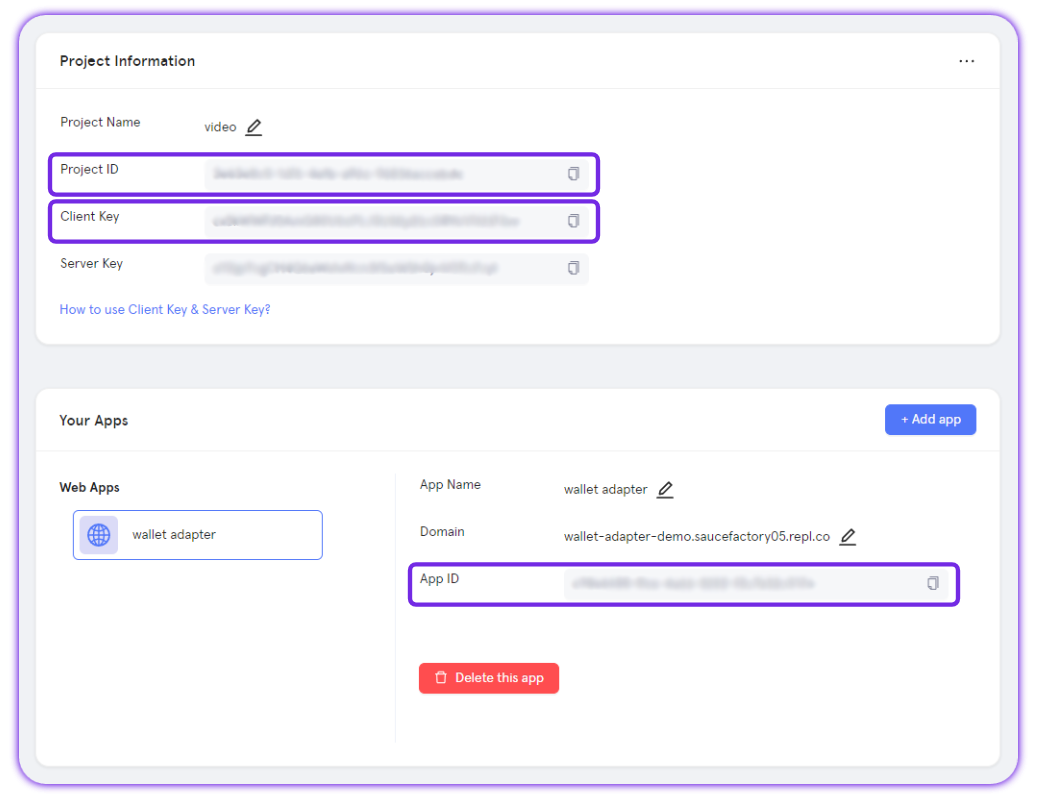
    **Particle Connect** requires three key values from the dashboard to be initiated: `projectId`, `clientKey`, and `appId`.

    To retrieve these values for configuration within your application, follow these steps:

    <AccordionGroup>
      <Accordion title="Access the Particle Dashboard">
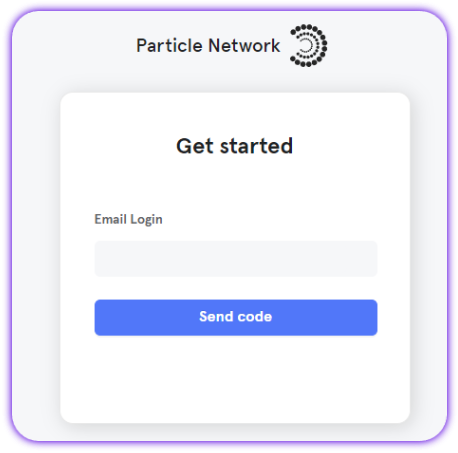
        Sign up or Log in into the [Particle dashboard](https://dashboard.particle.network/)

        <div className="flex justify-center">
          <img className="block h-64 dark:hidden" src="https://mintcdn.com/particlenetwork-fccf74d2/hR-XK15Ve4E3bk8E/social-logins/images/login.png?fit=max&auto=format&n=hR-XK15Ve4E3bk8E&q=85&s=82a68a9e5fce546a26db56e74d7c3b94" alt="Login into Particle." width="458" height="453" data-path="social-logins/images/login.png" />

          <img className="hidden h-64 dark:block" src="https://mintcdn.com/particlenetwork-fccf74d2/hR-XK15Ve4E3bk8E/social-logins/images/login.png?fit=max&auto=format&n=hR-XK15Ve4E3bk8E&q=85&s=82a68a9e5fce546a26db56e74d7c3b94" alt="Login into Particle." width="458" height="453" data-path="social-logins/images/login.png" />
        </div>
      </Accordion>

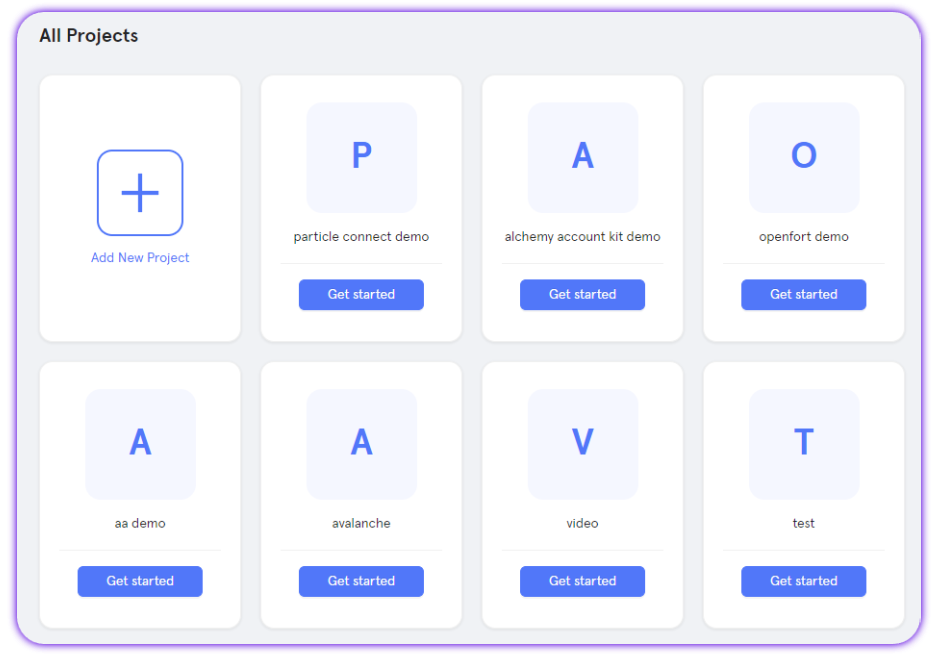
      <Accordion title="Create a new project or enter an existing project">
        <div className="flex justify-center">
          <img className="block h-64 dark:hidden" src="https://mintcdn.com/particlenetwork-fccf74d2/hR-XK15Ve4E3bk8E/social-logins/images/project.png?fit=max&auto=format&n=hR-XK15Ve4E3bk8E&q=85&s=1b5cd03116f224e1cba3a88a04a1f0a5" alt="Create Particle project." width="939" height="657" data-path="social-logins/images/project.png" />

          <img className="hidden h-64 dark:block" src="https://mintcdn.com/particlenetwork-fccf74d2/hR-XK15Ve4E3bk8E/social-logins/images/project.png?fit=max&auto=format&n=hR-XK15Ve4E3bk8E&q=85&s=1b5cd03116f224e1cba3a88a04a1f0a5" alt="Create Particle project." width="939" height="657" data-path="social-logins/images/project.png" />
        </div>
      </Accordion>

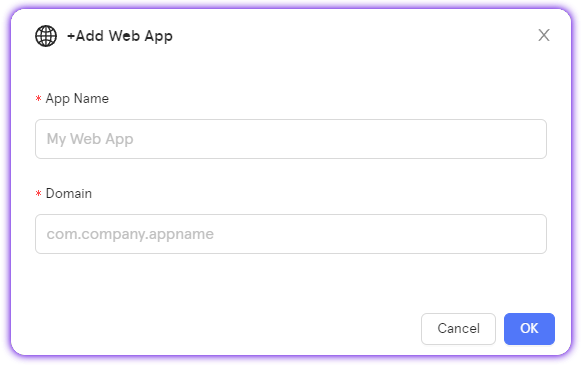
      <Accordion title="Create a new web application, or skip this step if you already have one">
        <div className="flex justify-center">
          <img className="block h-64 dark:hidden" src="https://mintcdn.com/particlenetwork-fccf74d2/hR-XK15Ve4E3bk8E/social-logins/images/web-app.png?fit=max&auto=format&n=hR-XK15Ve4E3bk8E&q=85&s=8f51019e7b9968aca5528541f819eb4e" alt="Create web app." width="584" height="369" data-path="social-logins/images/web-app.png" />

          <img className="hidden h-64 dark:block" src="https://mintcdn.com/particlenetwork-fccf74d2/hR-XK15Ve4E3bk8E/social-logins/images/web-app.png?fit=max&auto=format&n=hR-XK15Ve4E3bk8E&q=85&s=8f51019e7b9968aca5528541f819eb4e" alt="Create web app." width="584" height="369" data-path="social-logins/images/web-app.png" />
        </div>
      </Accordion>

      <Accordion title="Retrieve the project ID (`projectId`), the client key (`clientKey`), and the application ID (`appId`)">
        <div className="flex justify-center">
          <img className="block h-64 dark:hidden" src="https://mintcdn.com/particlenetwork-fccf74d2/hR-XK15Ve4E3bk8E/social-logins/images/credentials.png?fit=max&auto=format&n=hR-XK15Ve4E3bk8E&q=85&s=c196b87c62dc17aae0f624035e3a2c19" alt="Find app's credentials." width="1039" height="800" data-path="social-logins/images/credentials.png" />

          <img className="hidden h-64 dark:block" src="https://mintcdn.com/particlenetwork-fccf74d2/hR-XK15Ve4E3bk8E/social-logins/images/credentials.png?fit=max&auto=format&n=hR-XK15Ve4E3bk8E&q=85&s=c196b87c62dc17aae0f624035e3a2c19" alt="Find app's credentials." width="1039" height="800" data-path="social-logins/images/credentials.png" />
        </div>
      </Accordion>
    </AccordionGroup>

    <Note>For a quick overview of the Particle dashboard, watch [this video](https://www.youtube.com/watch?v=d7DYCMNDmjo\&ab_channel=ParticleNetwork) or check out the [Dashboard Quickstart Guide](/social-logins/dashboard).</Note>

    After obtaining your `projectId`, `clientKey`, and `appId`, you'll need to use these to configure the aforementioned `ConnectKitProvider` component from `@particle-network/connectkit`.

    The boilerplate already includes the basic variable setup —just add your API keys to the `.env.sample` file and rename it to `.env`.

    <Tip>
      At this point, you're ready to move onto either running and testing the application or beginning development through `app/page.tsx`.

      Although, below we'll continue and go over some of the granular controls given to you through `ConnectKitProvider`.
    </Tip>
  </Step>

  <Step title="Configuring ConnectKitProvider">
    When working with `ConnectKitProvider`, it's recommended to use a dedicated `Connectkit.tsx` file in the `src` directory where you can configure and export the component. Then, you'll use this export to wrap your main App component (the location of your Particle Connect implementation through `ConnectButton`).

    Here’s how you can configure `ConnectKitProvider`:

    **Required Configurations:**

    * `projectId`, `clientKey`, and `appId` — Get these from the [Particle dashboard](https://dashboard.particle.network/), as covered prior.
    * `chains` — Specify the supported chains for your dApp (this is an array of Viem-originating chain objects imported from `@particle-network/connectkit/chains`).
    * `walletConnectors` — Define the wallets you want to support.

    **Optional Configurations:**

    * `theme` and `language` for basic customization of the connection modal UI.
    * Additional appearance customizations.

    <Note>In the boilerplate application, you'll find a pre-configured `Connectkit.tsx` file located in the `src` directory.</Note>

    Below is an example of a configured instance of `ConnectKitProvider`. For more details around each available property, head over to the [Particle Connect Web SDK reference](/social-logins/connect/desktop/web).

    <InteractiveConnectkit />

    <Tip>For more detailed information, visit the full [**Particle Connect** SDK documentation](/social-logins/connect/desktop/web).</Tip>
  </Step>

  <Step title="Wrap your application with ConnectKitProvider">
    Wrap your primary application component (wherever you place and use `ConnectButton` alongside the various hooks from Particle Connect) with the `ParticleConnectKit` component (exported from `ConnectKitProvider`).

    Here’s an example of what this looks like for a `layout.tsx` file:

    ```tsx layout.tsx [expandable] theme={null}
    import { ParticleConnectkit } from '@/connectkit'; // Export of a configured ConnectKitProvider instance
    import type { Metadata } from 'next';
    import { Inter } from 'next/font/google';
    import './globals.css';

    const inter = Inter({ subsets: ['latin'] });

    export const metadata: Metadata = {
      title: 'Particle Connectkit App',
      description: 'Generated by create next app',
    };

    export default function RootLayout({
      children,
    }: Readonly<{
      children: React.ReactNode;
    }>) {
      return (
        <html lang="en">
          <body className={inter.className}>
            <ParticleConnectkit>{children}</ParticleConnectkit>
          </body>
        </html>
      );
    }

    ```

    <Note>In the boilerplate application, you'll find a pre-configured `layout.tsx` file located in the `app` directory.</Note>
  </Step>

  <Step title="Facilitating logins and chain interactions">
    With **Particle Connect** now configured, you can proceed to enable social logins within your application through the aforementioned `ConnectButton` component.

    Additionally, for driving application-level interaction (after initial onboarding), `@particle-network/connectkit` provides a variety of hooks. You can explore all available hooks in the [Particle Connect SDK documentation](/social-logins/connect/desktop/web#key-react-hooks-for-particle-connect).

    The boilerplate application includes a basic example featuring only a **Connect** button (`ConnectButton`).

    After logging in (connecting), users can access the embedded wallet modal provided by Particle Connect via the button in the bottom right corner, unless customized through the `wallet` configuration within `ConnectKitProvider`.

    To explore additional features like fetching and displaying user information, balances, on-ramp services, and sending transactions using either the native Particle Provider (Viem-based WalletClient) or ethers.js through an EIP-1193 provider, paste the following code into `app/page.tsx`.

    ```tsx page.tsx [expandable] theme={null}
    "use client";

    import React, { useEffect, useState } from "react";

    // Particle imports
    import {
      ConnectButton,
      useAccount,
      useDisconnect,
      usePublicClient,
      useParticleAuth,
      useWallets,
    } from "@particle-network/connectkit";

    // Connectkit uses Viem, so Viem's features can be utilized
    import { formatEther, parseEther } from "viem";

    // Optional: Import ethers provider for EIP-1193 compatibility
    import { ethers, type Eip1193Provider } from "ethers";

    export default function Home() {
      // Initialize account-related states from Particle's useAccount hook
      const { address, isConnected, isConnecting, isDisconnected, chainId } =
        useAccount();
      const { disconnect, disconnectAsync } = useDisconnect();
      const { getUserInfo } = useParticleAuth();

      // Optional: Initialize public client for RPC calls using Viem
      const publicClient = usePublicClient();

      // Retrieve the primary wallet from the Particle Wallets
      const [primaryWallet] = useWallets();

      // Define state variables
      const [account, setAccount] = useState(null); // Store account information
      const [balance, setBalance] = useState<string>(""); // Store user's balance
      const [userAddress, setUserAddress] = useState<string>(""); // Store user's address
      const [userInfo, setUserInfo] = useState<any>(null); // Store user's information
      const [isLoadingUserInfo, setIsLoadingUserInfo] = useState<boolean>(false); // Loading state for fetching user info
      const [userInfoError, setUserInfoError] = useState<string | null>(null); // Error state for fetching user info
      const [recipientAddress, setRecipientAddress] = useState<string>(""); // Store recipient's address for transactions
      const [transactionHash, setTransactionHash] = useState<string | null>(null); // Store transaction hash after sending
      const [isSending, setIsSending] = useState<boolean>(false); // State for showing sending status

      // Connection status message based on the account's connection state
      const connectionStatus = isConnecting
        ? "Connecting..."
        : isConnected
        ? "Connected"
        : isDisconnected
        ? "Disconnected"
        : "Unknown";

      // Load account details and fetch balance when address or chainId changes
      useEffect(() => {
        async function loadAccount() {
          if (address) {
            setAccount(account);
            setUserAddress(address);
            await fetchBalance();
          }
        }
        loadAccount();
      }, [chainId, address]);

      // Fetch and set user information when connected
      useEffect(() => {
        const fetchUserInfo = async () => {
          setIsLoadingUserInfo(true);
          setUserInfoError(null);

          try {
            const userInfo = await getUserInfo();
            console.log(userInfo);
            setUserInfo(userInfo);
          } catch (error) {
            setUserInfoError(
              "Error fetching user info: The current wallet is not a particle wallet."
            );
            console.error("Error fetching user info:", error);
          } finally {
            setIsLoadingUserInfo(false);
          }
        };

        if (isConnected) {
          fetchUserInfo();
        }
      }, [isConnected, getUserInfo]);

      // Fetch user's balance and format it for display
      const fetchBalance = async () => {
        try {
          if (!address) return;
          const balanceResponse = await publicClient?.getBalance({ address });
          const balanceInEther = formatEther(balanceResponse!);
          console.log(balanceResponse);
          setBalance(parseFloat(balanceInEther).toFixed(4)); // Display balance with 4 decimal places
        } catch (error) {
          console.error("Error fetching balance:", error);
        }
      };

      // Handle user disconnect action
      const handleDisconnect = async () => {
        try {
          await disconnectAsync();
        } catch (error) {
          console.error("Error disconnecting:", error);
        }
      };

      // Option 1: Send transaction using ethers.js with a custom EIP-1193 provider
      const executeTxEthers = async () => {
        const tx = {
          to: recipientAddress,
          value: parseEther("0.01"), // Set value to 0.01 Ether
          data: "0x", // No data, as there is no contract interaction
        };

        setIsSending(true);

        try {
          const EOAprovider = await primaryWallet.connector.getProvider();
          const customProvider = new ethers.BrowserProvider(
            EOAprovider as Eip1193Provider,
            "any"
          );

          const signer = await customProvider.getSigner();
          const txResponse = await signer.sendTransaction(tx);
          const txReceipt = await txResponse.wait();

          if (txReceipt) {
            setTransactionHash(txReceipt.hash);
          } else {
            console.error("Transaction receipt is null");
          }
        } catch (error) {
          console.error("Error executing EVM transaction:", error);
        } finally {
          setIsSending(false);
        }
      };

      // Option 2: Send transaction using the native Particle provider
      const executeTxNative = async () => {
        try {
          const tx = {
            to: recipientAddress,
            value: parseEther("0.01"), // Set value to 0.01 Ether
            data: "0x", // No data, as there is no contract interaction
            chainId: primaryWallet.chainId, // Current chainId
            account: primaryWallet.accounts[0], // Primary account
          };

          setIsSending(true);

          const walletClient = primaryWallet.getWalletClient();
          const transactionResponse = await walletClient.sendTransaction(tx);

          setTransactionHash(transactionResponse);
          console.log("Transaction sent:", transactionResponse);
        } catch (error) {
          console.error("Failed to send transaction:", error);
        } finally {
          setIsSending(false);
        }
      };

      // Parameters for the on-ramp URL
      const fiatCoin = "USD";
      const cryptoCoin = "ETH";
      const network = "Ethereum";
      const theme = "dark";
      const language = "en";

      // Function to handle the on-ramp button click
      const handleOnRamp = () => {
        const onRampUrl = `https://ramp.particle.network/?fiatCoin=${fiatCoin}&cryptoCoin=${cryptoCoin}&network=${network}&theme=${theme}&language=${language}`;
        window.open(onRampUrl, "_blank");
      };

      // Function to copy text to clipboard
      const copyToClipboard = (text: string) => {
        navigator.clipboard.writeText(text).then(() => {
          alert("Copied to clipboard!");
        });
      };

      // Function to truncate Ethereum address
      const truncateAddress = (address: string) => {
        return address.slice(0, 6) + "..." + address.slice(-4);
      };

      return (
        <div className=" flex flex-col items-center justify-between p-8 bg-black text-white">
          {/* Header */}
          <header className="mb-8 flex flex-col items-center">
            <img
              src="https://camo.githubusercontent.com/8f19e01ee2f062917c087e75d1a504315a04fbf8d42cbcd61fc4b8a20f11118e/68747470733a2f2f692e696d6775722e636f6d2f786d647a5855342e706e67"
              alt="Particle Network Logo"
              className="mb-4 w-96"
            />
            <h1 className="text-4xl font-bold">Particle Connect 2.0</h1>
            <h2 className="mt-4 text-xl font-bold">
              Particle Connect Quickstart— Fetch user data and send trasnactions
            </h2>
          </header>

          <main className="flex-grow flex flex-col items-center justify-center w-full max-w-6xl mx-auto">
            {/* Display connection status */}
            <div className="bg-gray-800 p-4 rounded-lg shadow-lg max-w-sm mx-auto mb-4">
              <h2 className="text-md font-semibold text-white">
                Status: {connectionStatus}
              </h2>
            </div>

            {isConnected ? (
              <>
                <div className="flex justify-center w-full">
                  <div className="grid grid-cols-1 md:grid-cols-2 gap-8 w-full max-w-4xl">
                    <div className="border border-purple-500 p-6 rounded-lg">
                      {isLoadingUserInfo ? (
                        <div>Loading user info...</div>
                      ) : userInfoError ? (
                        <div className="text-red-500">{userInfoError}</div>
                      ) : (
                        userInfo && ( // Conditionally render user info
                          <div className="flex items-center">
                            <h2 className="text-lg font-semibold text-white mr-2">
                              Name: {userInfo.name || "N/A"}
                            </h2>
                            {userInfo.avatar && (
                              <img
                                src={userInfo.avatar}
                                alt="User Avatar"
                                className="w-10 h-10 rounded-full"
                              />
                            )}
                          </div>
                        )
                      )}
                      <h2 className="text-lg font-semibold mb-2 text-white flex items-center">
                        Address: <code>{truncateAddress(userAddress)}</code>
                        <button
                          className="bg-purple-600 hover:bg-purple-700 text-white font-bold py-1 px-2 ml-2 rounded transition duration-300 ease-in-out transform hover:scale-105 shadow-lg flex items-center"
                          onClick={() => copyToClipboard(userAddress)}
                        >
                          📋
                        </button>
                      </h2>
                      <h2 className="text-lg font-semibold mb-2 text-white">
                        Chain ID: <code>{chainId}</code>
                      </h2>
                      <h2 className="text-lg font-semibold mb-2 text-white flex items-center">
                        Balance: {balance !== "" ? balance : "Loading..."}
                        <button
                          className="bg-purple-600 hover:bg-purple-700 text-white font-bold py-1 px-2 ml-2 rounded transition duration-300 ease-in-out transform hover:scale-105 shadow-lg flex items-center"
                          onClick={fetchBalance}
                        >
                          🔄
                        </button>
                      </h2>
                      <button
                        className="mt-4 bg-purple-600 hover:bg-purple-700 text-white font-bold py-2 px-4 rounded transition duration-300 ease-in-out transform hover:scale-105 shadow-lg"
                        onClick={handleOnRamp}
                      >
                        Buy Crypto with Fiat
                      </button>
                      <div>
                        <button
                          className="mt-4 bg-red-600 hover:bg-red-700 text-white font-bold py-2 px-4 rounded transition duration-300 ease-in-out transform hover:scale-105 shadow-lg"
                          onClick={handleDisconnect}
                        >
                          Disconnect
                        </button>
                      </div>
                    </div>

                    <div className="border border-purple-500 p-6 rounded-lg">
                      <h2 className="text-2xl font-bold mb-2 text-white">
                        Send a transaction
                      </h2>
                      <h2 className="text-lg">Send 0.01</h2>
                      <input
                        type="text"
                        placeholder="Recipient Address"
                        value={recipientAddress}
                        onChange={(e) => setRecipientAddress(e.target.value)}
                        className="mt-4 p-2 w-full rounded border border-gray-700 bg-gray-900 text-white focus:outline-none focus:ring-2 focus:ring-purple-400"
                      />
                      <button
                        className="mt-4 bg-purple-600 hover:bg-purple-700 text-white font-bold py-2 px-4 rounded transition duration-300 ease-in-out transform hover:scale-105 shadow-lg"
                        onClick={executeTxNative}
                        disabled={!recipientAddress || isSending}
                      >
                        {isSending ? "Sending..." : `Send 0.01 Particle provider`}
                      </button>
                      <button
                        className="mt-4 bg-purple-600 hover:bg-purple-700 text-white font-bold py-2 px-4 rounded transition duration-300 ease-in-out transform hover:scale-105 shadow-lg"
                        onClick={executeTxEthers}
                        disabled={!recipientAddress || isSending}
                      >
                        {isSending ? "Sending..." : `Send 0.01 with ethers`}
                      </button>
                      {/* Display transaction notification with the hash */}
                      {transactionHash && (
                        <div className="mt-4 p-2 bg-gray-800 rounded-lg text-white">
                          Transaction Hash: {transactionHash}
                        </div>
                      )}
                    </div>
                  </div>
                </div>
              </>
            ) : (
              <ConnectButton />
            )}
          </main>
        </div>
      );
    }
    ```

    <Tip>
      A Next.js demo repository containing the above code can be found [here](https://github.com/Particle-Network/particle-connectkit2.0-quickstart).
    </Tip>
  </Step>
</Steps>
