> ## Documentation Index
> Fetch the complete documentation index at: https://developers.particle.network/llms.txt
> Use this file to discover all available pages before exploring further.
# Unreal Engine (No-Code) SDK
> Interacting with Particle Auth within applications made using Unreal Engine.
## Particle Auth for Unreal Engine
Extending beyond directly programmatic implementations, **Particle Auth** also features full support for **Unreal Engine 5** through a no-code interface, enabling the integration of Particle's Wallet-as-a-Service in a familiar and straightforward environment when building games on Unreal Engine.
***
## Getting Started
Getting started with the **Particle Auth Unreal Engine SDK** is simple, although you must manually download and install the SDK using the [`particle-unreal` GitHub repository](https://github.com/Particle-Network/particle-unreal).
To install:
1. Open your project's root directly (you'll find your `.uproject` file here).
2. Create a new directory, `Plugins`, or skip this step if `Plugins` already exists.
3. Navigate to [`Plugins/ParticleSDK` within `particle-unreal`](https://github.com/Particle-Network/particle-unreal/tree/main/Plugins) and copy it to your `Plugins` directory.
4. Open the **Unreal Engine 5** editor, head over to **Menu**, then **Edit**, and finally **Plugins**, in which you'll find an option to enable **ParticleSDK**.
***
## Examples of utilization
### Initialization
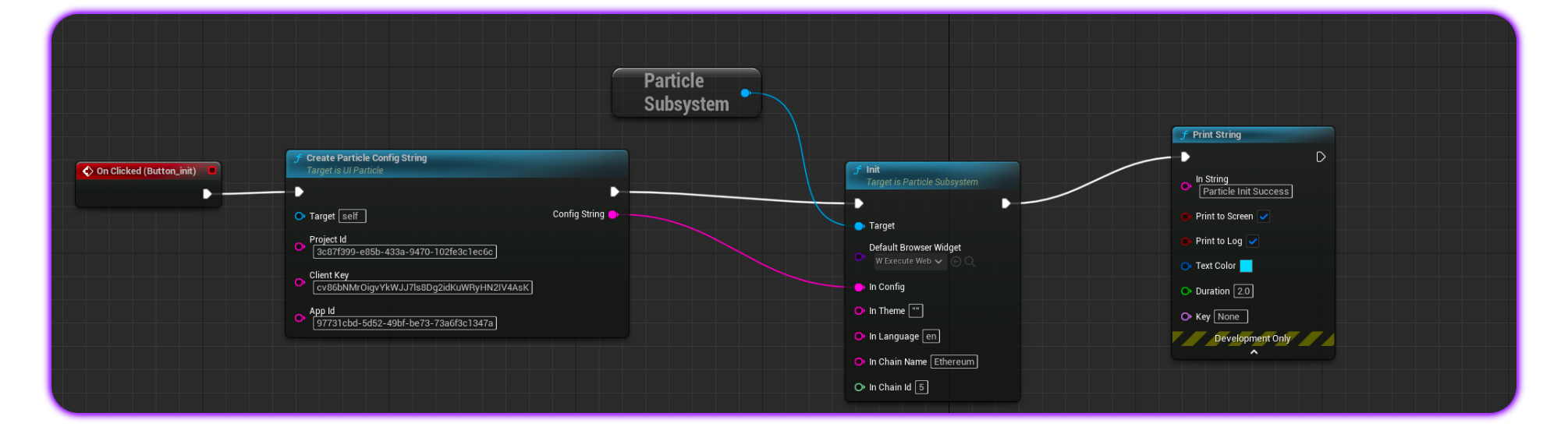
To begin, you'll need to create a config object with your `projectId`, `clientKey`, and `appId` filled in.
Find a guide on how to set up a project and find the required keys: [Dashboard Guide](/social-logins/dashboard).
After retrieving and setting the necessary values, you must call the `Init` function to complete the initialization. The `Init` function accepts the following parameters:
* **Default Browser Widget**: Typically set to `W_ExecuteWebBrowser`. If you prefer to use a custom `WebBrowser` blueprint, you can do so if it follows the structure of `W_ExecuteWebBrowser`.
* **In Config**: This links to the previously defined configuration object containing `projectId`, `clientKey`, and `appId`.
* **In Theme**: An optional JSON string for customization. For more details, see [Particle Auth Set Auth Theme](/social-logins/auth/desktop-sdks/web#usecustomize).
* **In Language**: Specifies the language used in the modal. Options include `en`, `zh-cn`, `zh-tw`, `ja`, or `ko`.
* **In Chain Name & In Chain Id**: Defines the primary chain to be used, either EVM or Solana. For details on specific `chainId` and `chainName` configurations, refer to [EVM Chains Structure](/social-logins/network-coverage).
 ### Login
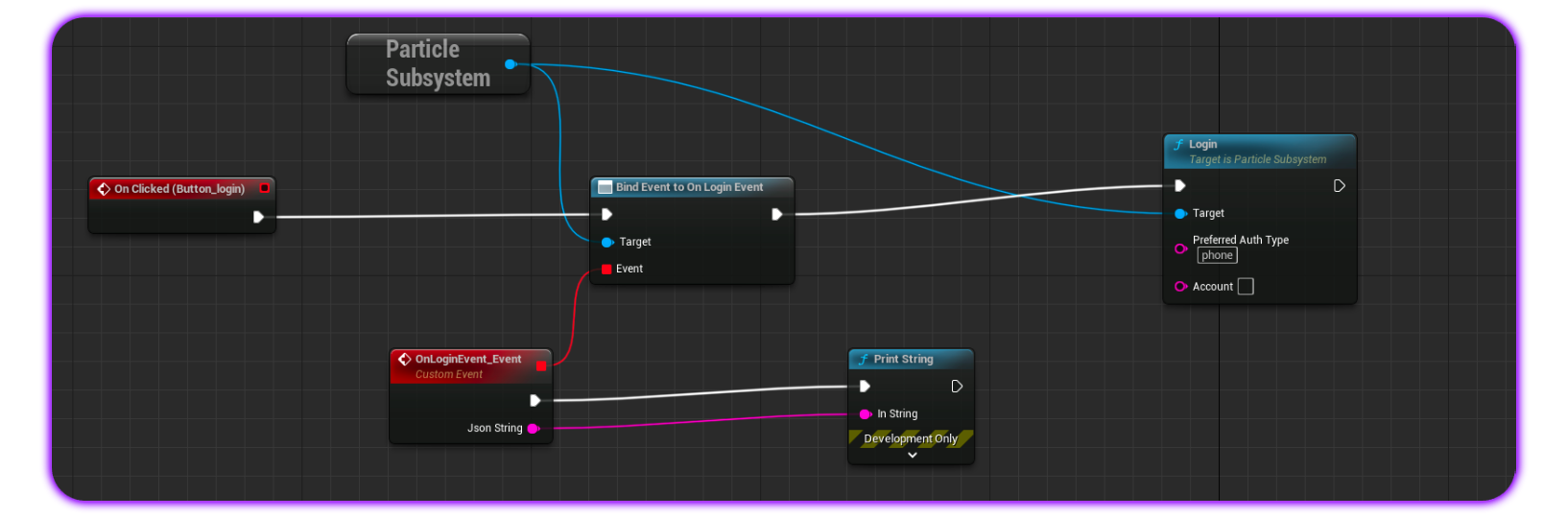
The `Login` function is the core method for onboarding and account creation/sign-in within **Particle Auth** on **Unreal Engine**. It supports social logins and includes the following parameters:
* **Preferred Auth Type:** (Optional) Specifies the authentication method. Options include:
* `phone` for phone-based logins (sends a verification text and links the account to a phone number).
* `email` for email-based logins (sends a verification email and links the account to an email address).
* `jwt` for custom authentication using JWTs.
* **Account:** (Optional) Used to pass the expected values for an email address, phone number, or JWT.
Upon successful login, the function returns a **JSON** string containing detailed user information (such as email or phone, addresses, UUID, token, etc.) as event data.
### Login
The `Login` function is the core method for onboarding and account creation/sign-in within **Particle Auth** on **Unreal Engine**. It supports social logins and includes the following parameters:
* **Preferred Auth Type:** (Optional) Specifies the authentication method. Options include:
* `phone` for phone-based logins (sends a verification text and links the account to a phone number).
* `email` for email-based logins (sends a verification email and links the account to an email address).
* `jwt` for custom authentication using JWTs.
* **Account:** (Optional) Used to pass the expected values for an email address, phone number, or JWT.
Upon successful login, the function returns a **JSON** string containing detailed user information (such as email or phone, addresses, UUID, token, etc.) as event data.
 ### Sign Message
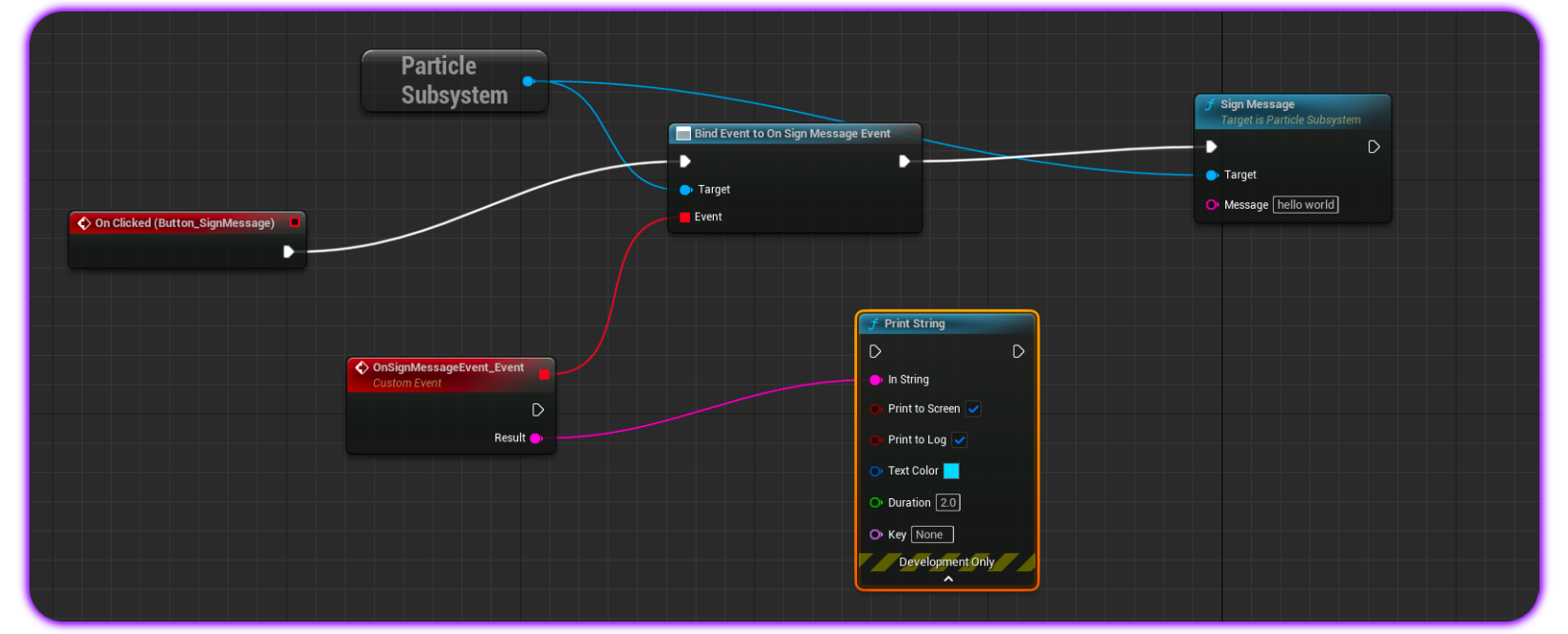
To prompt a standard message signature (for general strings, not typed data), you can use the `SignMessage` blueprint.
This blueprint displays a signature request for the end user to confirm. The `SignMessage` function includes the following parameter:
* `Message`: The message to be signed by the user. For EVM chains, this should be a standard UTF-8 string. For Solana, it should be a base58 string.
Upon successful confirmation, the signature is returned as event data via `OnSignMessageEvent`.
### Sign Message
To prompt a standard message signature (for general strings, not typed data), you can use the `SignMessage` blueprint.
This blueprint displays a signature request for the end user to confirm. The `SignMessage` function includes the following parameter:
* `Message`: The message to be signed by the user. For EVM chains, this should be a standard UTF-8 string. For Solana, it should be a base58 string.
Upon successful confirmation, the signature is returned as event data via `OnSignMessageEvent`.
 ### Sign and Send Transaction
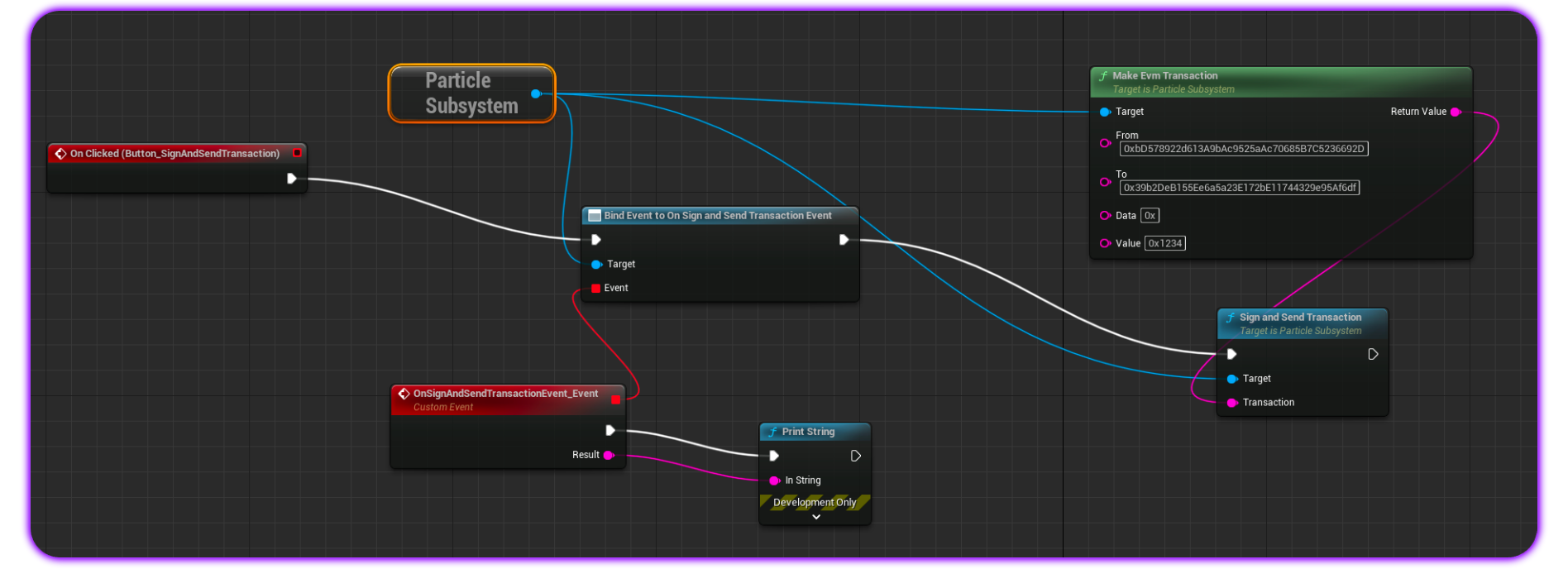
`SignAndSendTransaction` is the core method for sending transactions on EVM and Solana.
When called, it prompts the user with a transaction, allowing them to either confirm and push it to the network or reject and cancel the operation. The `SignAndSendTransaction` blueprint includes the following parameter:
* `Transaction`: A string representing the transaction object/structure to be sent. For EVM, this should be a standard UTF-8 string; for Solana, it should be a base58 string (it can be a stringified object).
You can also use the `MakeEvmTransaction` helper method to generate an EVM transaction, which can then be attached to the `Transaction` parameter in `SignAndSendTransaction` for no-code transaction creation.
Upon a successful signature, the event data, including the signature, is returned via `OnSignAndSendTransactionEvent`.
### Sign and Send Transaction
`SignAndSendTransaction` is the core method for sending transactions on EVM and Solana.
When called, it prompts the user with a transaction, allowing them to either confirm and push it to the network or reject and cancel the operation. The `SignAndSendTransaction` blueprint includes the following parameter:
* `Transaction`: A string representing the transaction object/structure to be sent. For EVM, this should be a standard UTF-8 string; for Solana, it should be a base58 string (it can be a stringified object).
You can also use the `MakeEvmTransaction` helper method to generate an EVM transaction, which can then be attached to the `Transaction` parameter in `SignAndSendTransaction` for no-code transaction creation.
Upon a successful signature, the event data, including the signature, is returned via `OnSignAndSendTransactionEvent`.
 ### Sign Typed Data
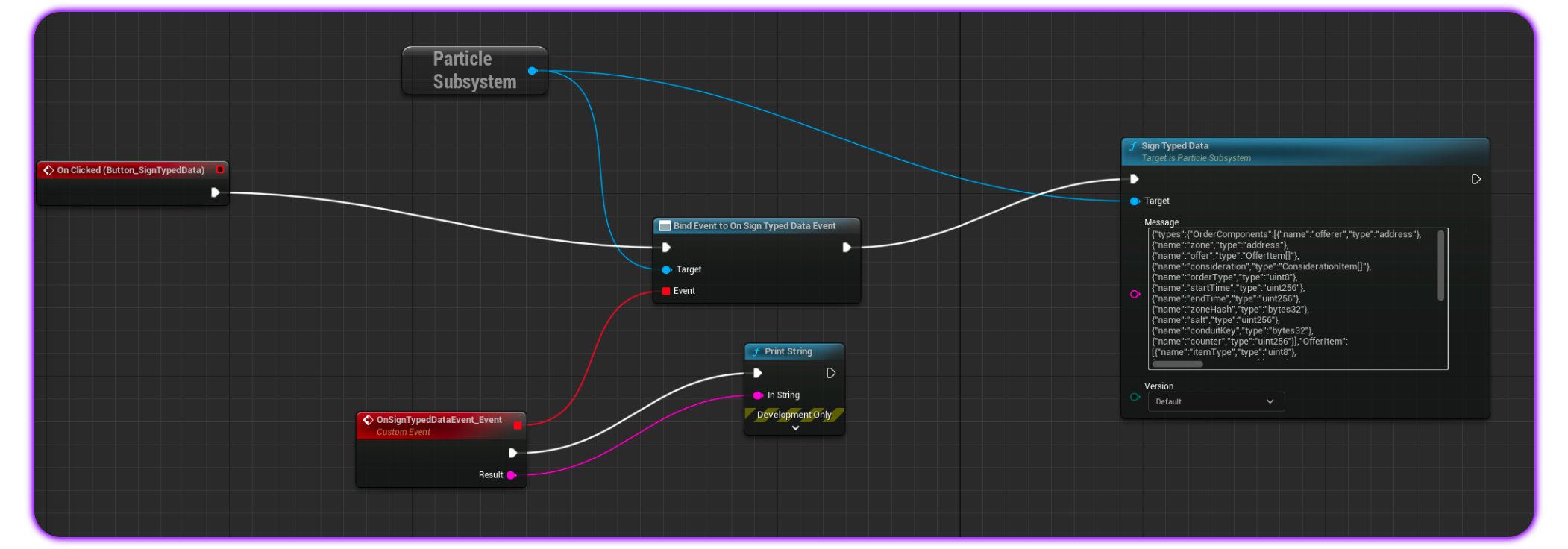
On **EVM** chains, you can use `SignTypedData` as an alternative to `SignMessage` for signing structured (typed) data.
The `SignTypedData` blueprint includes the following parameters:
* `Message:` The data to be signed is provided as a standard **JSON** string containing the data structure.
* `Version`: **Particle Auth** supports all three versions of `eth_signTypedData`: `v1`, `v3`, and `v4`. By default, `v4` is used.
Upon confirmation, the signature is returned via `OnSignTypedDataEvent`.
### Sign Typed Data
On **EVM** chains, you can use `SignTypedData` as an alternative to `SignMessage` for signing structured (typed) data.
The `SignTypedData` blueprint includes the following parameters:
* `Message:` The data to be signed is provided as a standard **JSON** string containing the data structure.
* `Version`: **Particle Auth** supports all three versions of `eth_signTypedData`: `v1`, `v3`, and `v4`. By default, `v4` is used.
Upon confirmation, the signature is returned via `OnSignTypedDataEvent`.
 ### Sign Transaction
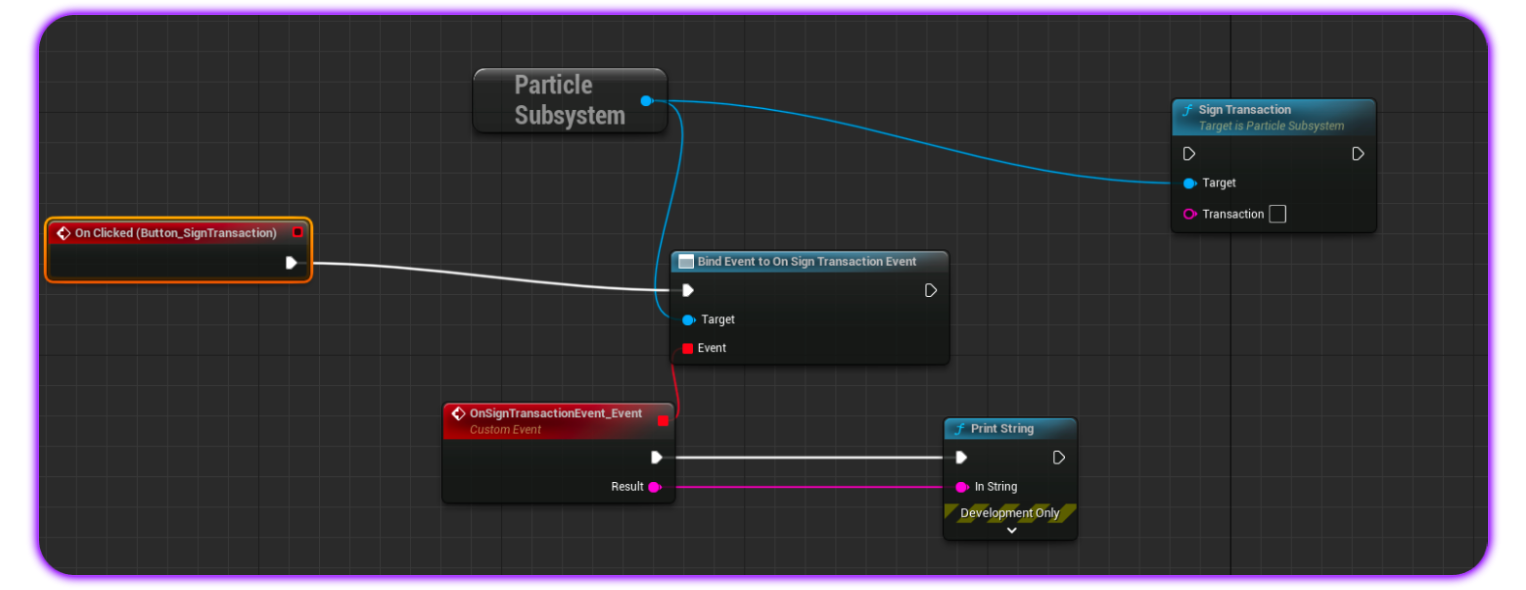
`SignTransaction` is a **Solana-specific** method for signing a transaction without pushing it to the network. The `SignTransaction` blueprint includes the following parameters:
* `Transaction`: A **base58** string representing a valid transaction structure to be signed.
Upon a successful signature, the completed signature is returned via `OnSignTransactionEvent`.
### Sign Transaction
`SignTransaction` is a **Solana-specific** method for signing a transaction without pushing it to the network. The `SignTransaction` blueprint includes the following parameters:
* `Transaction`: A **base58** string representing a valid transaction structure to be signed.
Upon a successful signature, the completed signature is returned via `OnSignTransactionEvent`.
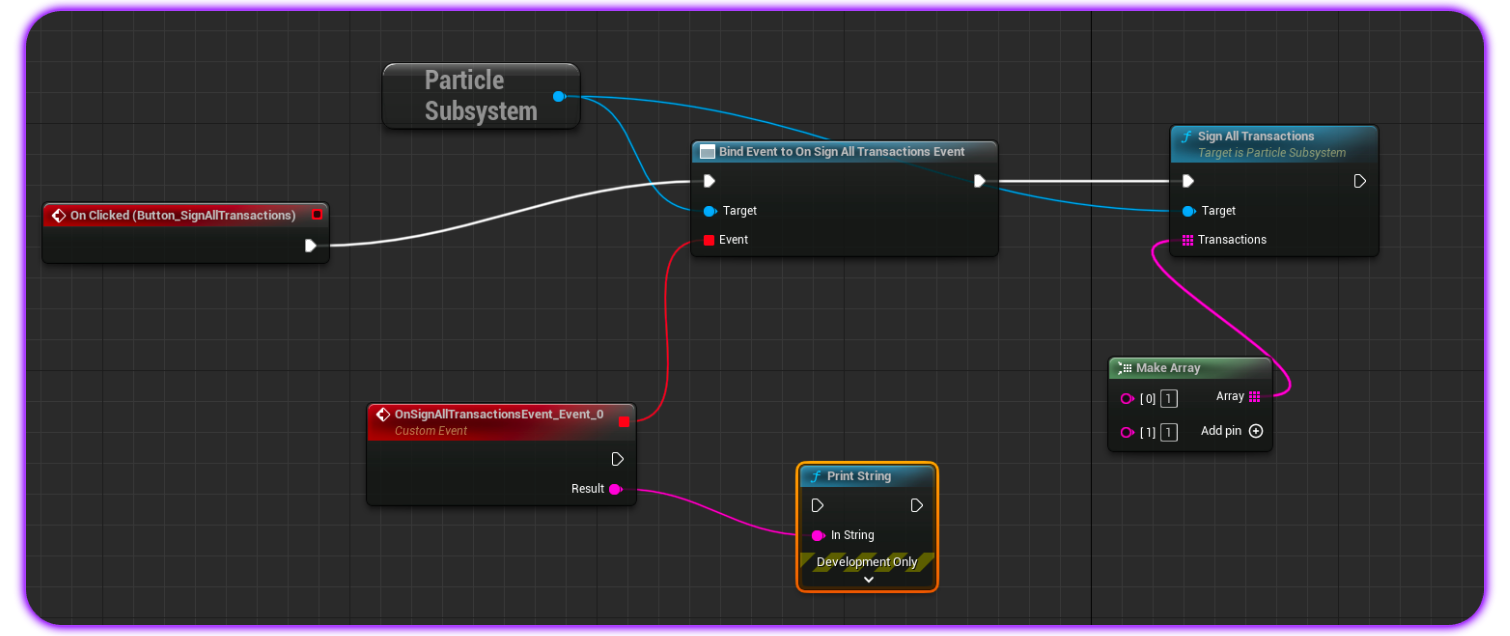
 ### Sign All Transactions
The plural counterpart, `SignAllTransactions`, is another **Solana-specific** method for signing multiple transactions collectively without pushing them to the network.
The `SignAllTransactions` blueprint includes the following parameters:
* `Transactions`: An array of base58 strings, each representing a valid transaction to be signed.
Once the function completes and the signatures are generated, they are returned via `OnSignAllTransactionsEvent`.
.
### Sign All Transactions
The plural counterpart, `SignAllTransactions`, is another **Solana-specific** method for signing multiple transactions collectively without pushing them to the network.
The `SignAllTransactions` blueprint includes the following parameters:
* `Transactions`: An array of base58 strings, each representing a valid transaction to be signed.
Once the function completes and the signatures are generated, they are returned via `OnSignAllTransactionsEvent`.
.