> ## Documentation Index
> Fetch the complete documentation index at: https://developers.particle.network/llms.txt
> Use this file to discover all available pages before exploring further.
# Paymaster
> How to use Particle Network’s Omnichain Paymaster for cross-chain gas sponsorship.
# Particle Omnichain Paymaster
The **Omnichain Paymaster** lets you sponsor gas fees across multiple chains with a **single USDT deposit**.
* Deposit USDT once (Ethereum or BNB Chain)
* Funds are automatically converted into the native gas token of the target chain
* Works out of the box with Particle’s Smart Wallet-as-a-Service
* Free to use on testnets (no deposit required)
* Fully customizable sponsorship logic via webhooks
This removes the need to manage separate balances for each chain.
***
## How to Use the Paymaster
There are two ways to use the Paymaster:
### 1. Through Particle’s AA SDKs
* Enabled automatically, no setup required.
* On testnets, transactions are sponsored for free.
* On mainnets, sponsorship is funded from your project’s Paymaster balance.
👉 Quickstarts: [Web](/aa/quickstart/web-aa) • [Mobile](/aa/quickstart/mobile-aa)
### 2. Through the Paymaster RPC
If you want direct control:
[https://paymaster.particle.network](https://paymaster.particle.network)
Supported RPC methods:
* `pm_sponsorUserOperation` — request gas sponsorship
* `pm_paymasterBalance` — check your deposit balance
👉 See [Paymaster RPC](/aa/paymaster/paymasterbalance) for examples and parameters.
***
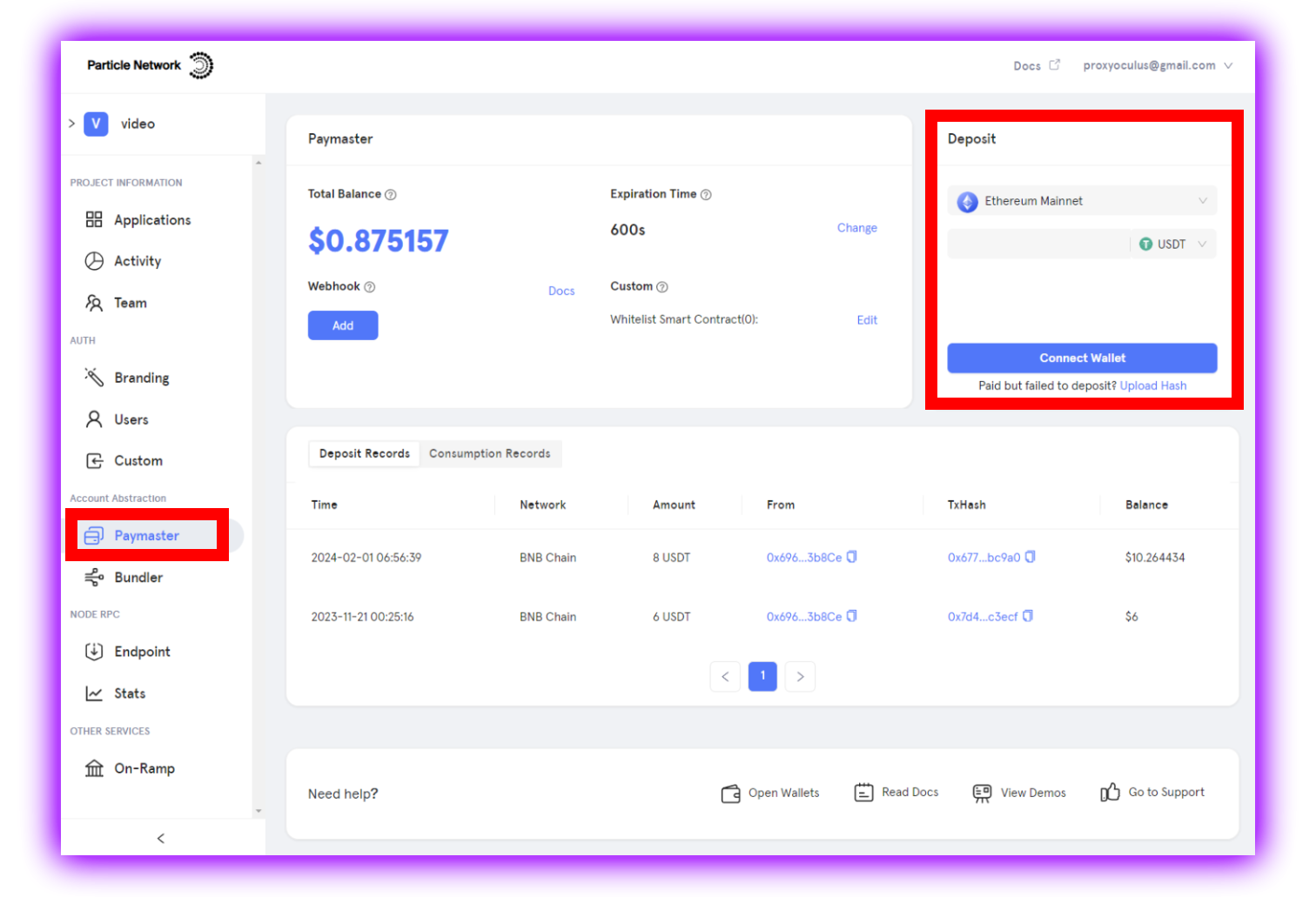
## Funding the Paymaster
To sponsor transactions on mainnets:
1. Go to the [Particle Dashboard](https://dashboard.particle.network).
2. Create a project (if you don’t have one yet).
3. Open the **Paymaster** menu.
4. Deposit USDT on **Ethereum** or **BNB Chain**.
* Deposits are tied to your project (`projectId`, `clientKey`, `appId`).
* Deposits automatically cover sponsorships across all supported EVM chains.
USDT is not required for testnet sponsorship.
***
## Conditional Sponsorship (Webhooks)
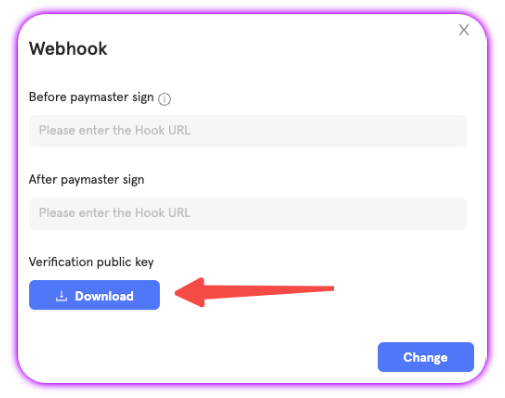
You can define rules for when sponsorship applies using **webhooks**.
Available hooks:
* `before_paymaster_sign` — runs before sponsorship; determines if the `UserOp` should be signed.
* `after_paymaster_sign` — runs after sponsorship; useful for logging or post-processing.
Both hooks receive:
* `projectUuid` — your project ID
* `chainId` — chain where sponsorship is requested
* `userOp` — the full `UserOperation` object
* `entryPoint` — standard EntryPoint address (`0x5FF137...`)
* `parsed` — simplified transaction array
Return `200` to confirm sponsorship, or `400` to reject.
### Example: `before_paymaster_sign`
```json json [expandable] theme={null}
POST https://your-domain/hook-before-paymaster-sign
{
"type": "before_paymaster_sign",
"chainId": 80001,
"projectUuid": "ef6c29f5-ad2b-545c-ad0c-54441068b71d",
"userOp": {
"sender": "0x2e9661BDA6201F97430dcc1541A1579b83980DD1",
"nonce": "0x05",
"initCode": "0x",
"callData": "0xb61d27f6000000000000000000000000ac6a87c681a5ed4cb58bc4fa7bf81a83b928c83c00000000000000000000000000000000000000000000000000005af3107a400000000000000000000000000000000000000000000000000000000000000000600000000000000000000000000000000000000000000000000000000000000000",
"callGasLimit": "0x9acc",
"verificationGasLimit": "0x0186a0",
"preVerificationGas": "0xc5dc",
"maxFeePerGas": "0xa79dd02a",
"maxPriorityFeePerGas": "0xa79dd015",
"paymasterAndData": "0x",
"signature": "0x"
},
"parsed": {
"accountType": "SIMPLE",
"txs": [
{ "to": "0xaC6A...", "value": "0x5af3107a4000", "data": "0x" }
]
}
}
```
### Example: `after_paymaster_sign`
```json json [expandable] theme={null}
POST https://your-domain/hook-after-paymaster-sign
{
"type": "after_paymaster_sign",
"chainId": 80001,
"projectUuid": "ef6c29f5-ad2b-545c-ad0c-54441068b71d",
"userOpHash": "0x45d4f...",
"userOp": { "sender": "0x...", "nonce": "0x05", ... }
}
```
### Request Verification
All webhook requests from Particle are signed.
* A unique RSA-2048 keypair is generated for each project.
* Download your project’s public key from the Particle Dashboard.
* Use it to verify the `x-particle-signature` header on incoming requests.
### Additional Resources